

Do you want to Increase your Growth?
So there are many tools which can help you to do so. So one of the tools in Chrome.

Now if you don't know about Chrome or its Features then it is the right time to know about it because if you want to increase your growth then the Chrome Browser is the right tool to do so.
We all know that there are hundreds of extensions available on Chrome Web Store which can help you to increase your growth.
But I have selected the top 8 and absolute best chrome extensions which can help you to reach out to your goal.
I want to share these chrome extensions with you.
The reason why I am sharing these because these 8 chrome extensions are free, easy to use, and will help you to reach your goal.
These tools or extensions will help you to do research, manage your work, and will reduce your work.
The tools which I'll be telling you about have helped me many times and I think it will help you too.
All tools which are listed down have been used by me and still, I am using these tools to achieve my goals.
So, before we dive into the 8 Amazing Chrome Extensions for Digital Marketing; I want to tell that why you should be using Gooogle Chrome.
 Why you should be using Google Chrome?
If we look at the stats on the most popular browses then you might be looking that Google Chrome is on the top of the list.
I know that some of you may be using Safari, Mozilla Firefox, Microsoft Edge or some other but I recommend you to look at Google Chrome
You'll be thinking that why should I go for Google Chrome just for the reason that Chrome is one of the most popular browsers or one of the best browsers available.
 |
| image source: statscounter |
Then just hold on a minute.
Don't ever switch over to anything just because it's popular.
I want you to trust the tool before you use it because without trust you would think that you should not use that tool.
So I recommend you look at Google Chrome and see its features. What does Google Chrome will do for you to increase your growth?
So, now let's look at a little bit of History about Google Chrome.
History of Google Chrome
According to Wikipedia, In September 2004 rumors of Google building, a Web Browser first appeared. The Development was led by Sundar Pichai.
The Browser was publicly released on 2 September 2008 for Windows XP.
On May 25, 2010, Google released stable versions for all three platforms (Windows, OS X, and Linux)
In Feb 2012 Google released the beta version of Google Chrome for Android 4.0 devices and later the stable version was released on June 27, 2012.
The Browser was publicly released on 2 September 2008 for Windows XP.
On May 25, 2010, Google released stable versions for all three platforms (Windows, OS X, and Linux)
In Feb 2012 Google released the beta version of Google Chrome for Android 4.0 devices and later the stable version was released on June 27, 2012.
Now let's look at the features of Google Chrome.
Features of Google Chrome

- Like most of the Browsers, it's free.
- Google Chrome is fast, works on smartphones, and many more just in one browser.
- Settings Synchronization
- Security
- Password Management
- Malware Blocking
- Adblocking
- Privacy
- Incognito Mode
- User Tracking
- Do Not Track
- Speed
- User Interface
- Changing Themes
- Shortcuts
- One of the important features which are in our purpose is the extensions, you can add as many extensions you want to which are useful to you.
Extensions
The feature which is in our purpose is the chrome extensions, as I already mentioned that you can add as many extensions you want which are useful to you.
For example:- the popular chrome extension Hunter helps you to find email addresses in seconds, building lists, and domain search.

So extensions are really easy to install.
To install Chrome Extensions, you have to perform 5 steps:-
Step #1 -
Head over to Google Chrome
Step #2 -
Go on to the Search Bar and type Chrome Web Store or what you can do this is to click on the three tools and click on more tools and then you have to choose extensions ( you will be redirected to the Chrome Web Store )
Step #3 -
Now after you're in the store, go on the search bar and type an extension which you want to add for ex:- I will type Hunter
Step #4-
Then on the left side click on the extensions and then you have to find your extension
Step #5 -
After you have found your extension just click on ADD TO CHROME button and then a drop-down box will appear, you have to simply click on ADD EXTENSION.
Boom! Your Extension is successfully been added to your list.
You would see an icon of your added extension on the top right corner
Just click on it to view the extension.
For all the extensions you want to install will follow the above 5 steps.
So now you see it's really simple. and the most important thing I want you to note is that you're all in one just in one single browser.
This is the reason why I love to use the Chrome Browser.

Now there is one step which you have to follow if you want to remove an extension. You just have to right-click on the installed extension icon on the top right corner and for the appearing list you have to click on remove extension and then the extension will be removed successfully.
So now you see it's just one click to remove an extension.
So now understand that it's really simple to install and remove an extension.
This is the reason why I love to use the Chrome Browser and I will share the 8 Amazing Chrome Extensions which will improve your Marketing and will help you to increase your growth.
So let's dive in straight to look at the 8 amazing Chrome Extensions.
So to start with, I want to share a tool that will help you to perform Keywords Research and it's really helpful in increasing your growth.
 #1: Keywords Everywhere
Keywords Everywhere is a tool designed for performing keywords research because keywords research is really important and the purpose of performing keywords research is to look out for words & phrases that people often search on search engines like Google or any other one.
Keywords Everywhere are one of the most popular and useful Chrome extensions.
So now you'll be wondering Why this tool is popular?
The main reasons are not the numbers, the reason behind its popularity is its features.
So you probably would be thinking that What are its features?
Before I tell you about the features, I want you to look at its versions.
So Keywords Everywhere is available in two versions: Free and Paid.
So most you would think that paid version would be better to use if we're a newbie.
So I want you to hold on for a minute. If you are a newbie then I would recommend you to use the Free Version.
I have already said don't just take my words, there is a reason behind everything.
So the reason I want you to opt the free version if you're a newbie is that you're starting as a fresher and I don't want you to just spend your resources just for buying the best version.
If you use the free version strategically then this whole free thing will help you increase your growth.
So now let's look at the features of both free as well as paid versions.
So now let's look at the features of both free as well as paid versions.
Free:- As I already said that if you are a beginner then it is recommended to use the free version. The free version helps you to find related keywords and people also search for keywords. These two widgers are added to the right side of the page after you have installed the extension.

Paid:- So paid version is suitable for those people who are experienced or professionals. The Paid version provides more features with the other two features specifies above. The paid version provides monthly search volume, CPC ( Cost per Click ), and Competition Data.

Watch the Video for Better understanding:-
If you're willing to use the paid version, then you should be paying attention to the pricing plan of Keywords Everywhere - Click here to see the pricing plan.
This tool also helps in Youtube by giving you details and insights.


Now its time to look at a. tool which really beneficial for Youtube Creators.
 #2: VidIQ
VidIQ is a popular tool that will help you to get more views and subscriptions on Youtube.
This tool is common among marketers and as I said it's really beneficial in Youtube Marketing.
VidIQ is probably the best tool for video analytics.
For every keyword or phrase, you type on the Youtube search bar VidIQ will give you a detailed breakdown, this will give you meaningful insights.
When you first type in a keyword or phrase after installing the extension then you will see VidIQ widgets on the right side below the keywords everywhere data.
Now the most important question Why should we use VidIQ?
The answer to the above question is VidIQ's features, So now lets dive into the Features of VidIQ.
Check out All features by clicking here.
Check out the pricing of VidIQ- Click here
To install the extension just click here.
So you're getting all in one.
It is recommended to use Similar Web because it is used by many popular brands.
If you want to do Competitor Analysis then Similar Web is the best extension for you.
Now you'll be thinking that what are the features of similar web?
This tool is common among marketers and as I said it's really beneficial in Youtube Marketing.
VidIQ is probably the best tool for video analytics.
For every keyword or phrase, you type on the Youtube search bar VidIQ will give you a detailed breakdown, this will give you meaningful insights.
When you first type in a keyword or phrase after installing the extension then you will see VidIQ widgets on the right side below the keywords everywhere data.
Now the most important question Why should we use VidIQ?
The answer to the above question is VidIQ's features, So now lets dive into the Features of VidIQ.
Features of VidIQ -
- As I already mentioned VidIQ is the best tool for Video Analytics because it provides you important insights that would help you to get more views and subscriptions on Youtube.

- VidIQ provides you a search panel after you install the extension which includes:
- Highest Views
- Average Views
- Average Subscribers
- Average Age
- Top Creator
- After the Search Panel's active VidIQ will provide you the overall score of that particular keywords or phrase, This includes:-
- Volume
- Competiti on
- After that, you'll be provided with Top Channels for that Search Term

- Then you'll see Related Queries
- After Related Queries, you'll get Related Keywords and Related Videos for that particular search term.
The thing here to note is, that Related Keywords and Related Videos will be shown only if you upgrade to VidIQ pro for which you have to pay for.
- You can also enable inline Keywords which would be present on the top of the page.
Check out All features by clicking here.
Check out the pricing of VidIQ- Click here
To install the extension just click here.
 #3: Similar Web
So now you're good with VidIQ, its time to see another analytics tool that is designed for web analysis and app analysis.
So, Similar Web is a very popular tool and one of the most beneficial tools because it provides overall analytics for any website or app.
So you're getting all in one.
It is recommended to use Similar Web because it is used by many popular brands.
If you want to do Competitor Analysis then Similar Web is the best extension for you.
Now you'll be thinking that what are the features of similar web?
Features of Similar Web
According to Similar Web,- Reveal best strategies from the market and Competitors.

- It'll help you to understand your market, competitors, and customer.
- Enhance your Performance throughout your Sales funnel.
- Evaluate Companies and empower better investment decisions.
- You can get competitors analytic and by this you can build or improve your marketing strategies.
So these were the features of Similar Web.
One of the best things is that you can try it for free and to build trust you can schedule a demo.
So, Similar Web is also available in free as well as in paid version.
Let's dive in straight to view both versions.
So, Similar Web is also available in free as well as in paid version.
Let's dive in straight to view both versions.
Free:- So the free version is absolutely best for beginners because you'll be getting 5 results per metric, 3 months of Web Traffic Data, and 1 month of Mobiel App Data. This is enough for a beginner.
Paid:- So as I have already mentioned the Paid versions are good for professionals. But still, for your knowledge I'm going to give the details that what you'll be getting if you opt the Paid version. So Paid Version includes increasing the data of the number such as 28 months of Mobiel App data, 3 Years of Web Traffic data, and unlimited results per metric. There are more features that you can check out by simply clicking on here.
Now if you want to check out the pricing of Similar Web then click here
So now we know what is Similar Web.
Now the tool which I am going got share with you is my personal favorite and with this said let's see that tool.
So now we know what is Similar Web.
Now the tool which I am going got share with you is my personal favorite and with this said let's see that tool.
#4: Grammarly

Yeah! Grammarly is a very popular tool that is designed for improving your writing.
Do you know why it is popular?
Let me get this straight.
Grammarly not only improves your writing; it also checks grammar, spelling, or any other writing issues and may thing to note it is also corrects it.
With correction, Grammarly also assists you.
Now the question which arises in the mind is How?
Let me just clear your hows
If you know what is Grammarly or you're using Grammarly or you have used Grammarly in the past then you may/might know What is the answer to that How?
So when you're writing something online whether on writing an email, blog post, or any other thing when Grammarly is in active mode then you would recognize a small icon of Grammarly at the bottom.
If you noticed, let me know in the comments below.
So, let's straight-up everything
When you click on that icon you would be redirected to the Grammarly Editor, Yes the Grammarly Editor. Now if you see the right side of your screen there you will recognize something like analytics
Yeah! Analytics.
Now you'll think what are those?
By going through that analysis you would get some idea that Grammarly it's not only improving your writing, it is also analyzing your content.
So that is the Grammarly Assistant.
- Now if you take a closer look then the first thing which you'll see your Overall Score and if you click it then you would see your performance and below that there is a Goals tab from where you can set or adjust your goals.
- Secondly by using the assistant you would see the Correctness tab Which is really important because it checks your spellings, grammar to any other common issues.
- Next is your Clarity which increases or decreases as per your content clearance because whatever message you're gonna deliver to your audience should be clear and you know if you are not clear then you can't hope that your content too will be clear to your audience. So this is very beneficial because you're getting the idea for your content clarity. By this, you can make your content more clear and it will be easy to understand by your audience and they will understand the correct message which you wanted to deliver. it includes readability and conciseness
- Next is your engagement section which will give you an idea that is your content engaging.
- Next is Delivery which includes your tone, Language, politeness, formality level.
- Last but not least is Plagiarism ( This is Included in the premium alerts )
- Correctness, Clarity, Engagement, Delivery, and Plagiarism are included in Alerts Section
Don't worry there are a lot more plagiarism checkers out on the internet. So you can stick with the free version but if you want more advanced functions or if you want that your content should be fantastic you can go for the Premium Version.
NOTE:- For this extension, I have no recommendation because you only know what is your requirement.
So, beginners, you can choose your plan according to your requirement, just click here
Click here to Install Grammarly
By now if you're alive let's look at another extension which is really beneficial because this can reduce your link shortening problem.
If you're thinking what I am thinking then you're right.
#5: Bitly -
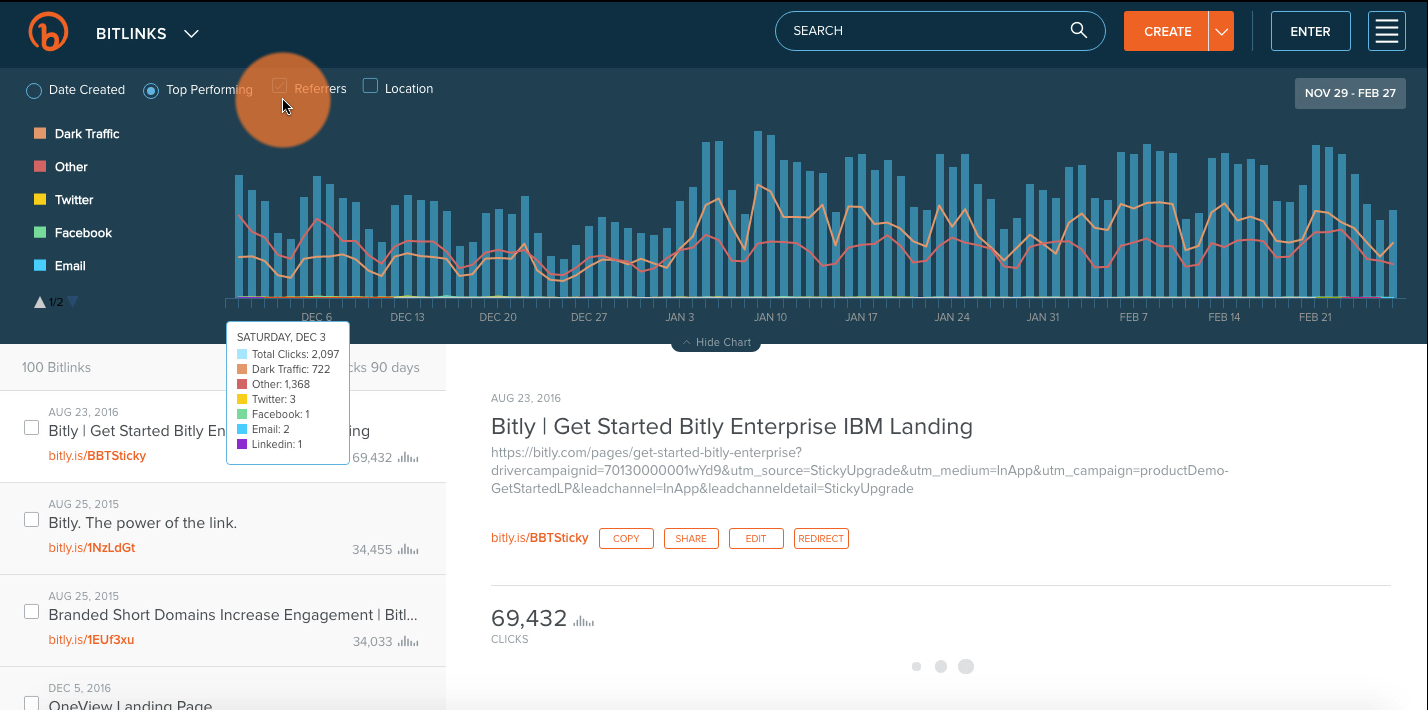
In short, all know the popular URL shortener bitly which really useful.

Bitly is a link management platform.
Bitly uses HTTP 301 redirects for its link. One thing which cannot be changed after it is created is the link that shortened.
All around the Globe knows that Bitly uses a bit.ly domain.
One feature which I like is that you can add a + sign to see the long URL before visiting it. So this feature is really good.
- To activate your bitly extension you have to click on it and then you have to sign up with Googe or with your email.
- After you have completed the basic steps then you'll be redirected to your dashboard.
- After that you can create short links by using the extension itself.
So this was a short and crisp overview of Bitly. Sign up for free on Bitly just by clicking here.
Click here to Install Bitly
Click here to Install Bitly
 |
| image source: bitly
So creating links is easy but to manage passwords is quite a huge task,
|

#6: LastPass
As I already mentioned remembering passwords is a huge task.
So, Lastpass is a tool designed to manage your passwords. It remembers all of your passwords.

Now you'll be thinking that yeah! I have understood what actually is LastPass? but How to set up a Lastpass account?
This is really simple, just follow the steps below:-
Step #1: Now to start with LastPass you first have to click here.
Step #2: After you click, you will be redirected to the official website of LastPass.
Step #3: You can Start for free on Lastpass, just click on that red button.
Step#4: Now you have to sign up with your email and the main thing; you have to create a master password.
Now you have to add Lastpass Chrome Extension - Click here to install.
- After installing you have to log in and then you have to click on open my vault.
- Now you can add items just by clicking by the red plus icon on the bottom right corner.
Lastpass is Available in Free as well as in Paid. Click here to see the pricing plan.
Now you'll be thinking What are the features of Lastpass?
Features of LastPass:
- Autofill
- Password Manager
- Password Generator
- Authenticator
- personal Vault
Now it's your time to setup Lastpass. Click here to set up
So now its time to see my favorite extension.
So now its time to see my favorite extension.
#7: Ubersuggest
 Everyone knows the popular tool ubersuggest. It is one of the most beneficial and useful extensions in the chrome web store.
So Why should we use ubersuggest?
This question would be circling around your head.
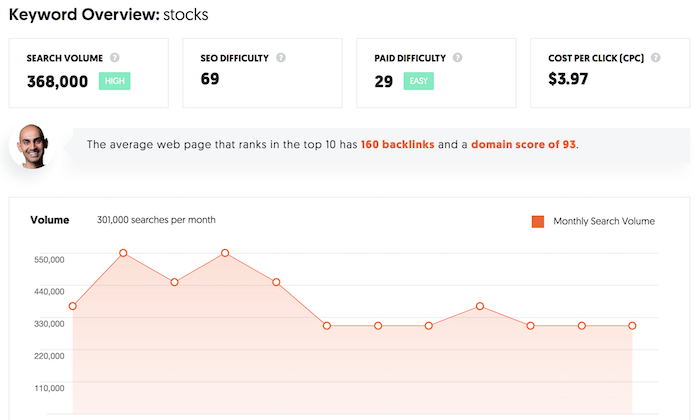
Ubersuggest is a keywords research tool. I have already mentioned about Keywords Research.
One thing which you will love is that; this tool is free.
 |
| image source: Ubersuggest |
Yes Free Keywords tool.
Ubersuggest is the best keywords tool because it has everything which you need.
Just one step setup i-e to sign up with your Google Account.
Now you'll be thinking about why it is the best?
The reason is one-word Features.
Now you'll be thinking about the features.
Features of Ubersuggest:
- Domain Overview-
The First feature is Domain Overview. By this, you can get the insights for a domain.
Now you'll wonder what insights?
- Traffic
- Organic Keywords
- Paid Keywords
- Total traffic
- Paid Add Cost.
- Find the Top SEO Pages-
By this, you'll see the top SEO Pages; This is really useful because, by this, you can see your competitors page which is ranking for that organic keyword. This feature saves you time.
- Keywords suggestion -
By using Ubsersuggest you'll get keywords suggestions along with search volume, competition, CPC, Trends, SEO difficulty as well as the Paid Difficulty.
- Content Ideas -
The tool provides you with Content ideas, by this, you can build your content strategy. You'll see your competitor's content which is getting shares and backlinks.
- Backlinks-
Backlinks are hard to build but by using Ubersuggest, you can see content that is being linked. Then you can make a list of those sites and ask them to link out to you.
So check out Ubersuggest by clicking here
Install Ubersuggest by clicking here
So if you're still in then let's look at the last extension which is really helpful.
#8: Buzzsumo
 Now this tool is really interesting. The question arises why?
The answer to Why is also interesting.
First Click here to sign up on Buzzsumo
After you have signed up just click here to install its extension.
- Now By using Buzzsumo you can get social engagement data for the current website you're viewing or for any other website you view.
- You can see the Page Actions - you can the shares and backlinks.
- You can go to Website actions which include Most shared Content.
- By suing buzzsumo extension you can analyze the website.
- And you can even save the article you want to view the article again.
Watch the Video-
Install Buzzsumo by clicking here
#Bonus: HTTPS Everywhere.
 So, we have seen the 8 Amazing Chrome Extensions but this is something which you don't wanna miss out.
Https Everywhere is a free tool which is really good and helpful,
This extension is offered by EFF which switches hundreds of insecure sites to secure (http to https)
You can Disable this extension for a particular site if it causes a site to look weird or break.
Conclusion:
In this article we looked at the 8 Amazing Chrome Extension which can help you to increase your growth and it will improve your Digital marketing.
Along with Amazing 8, we looked at the bonus extension Https Everyehrere which will protect you. It will switch insecure sites to secure sites.
All tools specified above are very beneficial if you are a beginner, intermediate, or professional.
So I think you're ready to use these tools.
General FAQs
Are all the extensions must-have?
Not all extensions are must-have but Extensions such as Ubersuggest, Similar web, Grammarly, and Bitly re the must-have extensions.
Is Paid Version of these tools Important?
Yes, the paid version of these tools is also important because it includes many advanced options that the free version doesn't have. But remember First you have to try the tool, you have to check whether the tool is suitable or whether the tool is satisfying your needs.
If you are a Beginner, then pls go for free because before switching to the paid version you need some experience as it is important but for Grammarly, you can go for free or paid because the content which you want to create is totally based on your knowledge.


1 Comments
This is really an engaging article.
ReplyDeletePls do not enter any spam link in the comment box